Are you on the latest ConcourseConnect? As of August 2017 we've had 70 releases which include features and fixes.
Some of the latest features are:
- Mobile API additions
- New modules for competitions
- Community points improvements
- Support for Apple Health and Fitbit APIs
- 3rd party importing
Check your Admin module, then System Info and you'll see the version number and release date.
View Full Post and Comments
Here's the latest integrations and developer resources for ConcourseConnect:
Android Apps
https://play.google.com/apps/publish
Apple iOS Apps, Push Notifications
http://developer.apple.com
Authorize.Net Credit Card Payment Processing
http://developer.authorize.net
Chargify Subscription and Recurring Billing Integration
https://www.chargify.com
ETouches Event Integration
https://www.etouches.com
Facebook Login for web and mobile
http://developers.facebook.com
Google Analytics
https://analytics.google.com
Google DoubleClick for Publishers
https://www.google.com/dfp
Google Maps, Geo Services, Android, Messaging
https://console.developers.google.com/project
Here Maps and Geo Services
http://developer.here.com
OpenDataSoft
https://www.opendatasoft.com
Twitter Integration
https://dev.twitter.com
Ustream Integration
http://developers.ustream.tv
YouTube Integration
https://developers.google.com/youtube/
View Full Post and Comments
This is the first feature roundup so this will mostly be a list of improvements and changes to ConcourseConnect over the past few months.
Upgrades are continuously rolled out to customers as development items are completed, features are tested, and issues resolved. Upgrades typically occur with a specific customer site and then the feature is rolled out gradually to others.
What's new in Connect?
- Badges have been integrated with the search engine to filter results by badges
- New data directories can be added via the Admin module; each receives a data-driven/dynamic landing page with portlets for showing profiles, searching and adding new data
- More widgets and modules have been updated with the Zurb Foundation UI
- More UI Buttons and Icons use FontAwesome
- The user list can be exported to Excel for analysis
- Added INR and CHF currencies
- Profile custom data and Profile user-related custom data has been added to profiles and the api to record custom data
- An OpenDataSoft portlet has been added to integrate with OpenDataSoft Data Portals
What's changed in Connect?
- In process or broken images now retry and fallback to a default
- Google Analytics updates
- Facebook integration updates
- Profile wiki can show information from the profile's custom data
- Search results can show a badge next to the profile
- Landing pages adapt to the number of underlying profile data... showing the complete list of profiles or showing just what's new and linking to a show more page
- User messaging rules require you to be friends, although an Admin can always initiate a conversation
- User experience improvements
What's new with the API?
- /api/category added to create campaign categories
- /api/checkIn tags capability
- /api/checkInList returns date range, tags, messages
- /api/message treated the same as web messages
- /api/photoList can be limited to geocoded entries and shape boundaries
- /api/profileList can be limited to geocoded entries and shape boundaries, can include badge info
- /api/site includes useful information about the user including badges and capabilities
- /api/status
- /api/statusList
What's new with mobile?
- Photos can be geocoded and shown on a map
- User generated data points can be put on a map and updated at a later time
- Data can be bound by geographic shapes
- Search improvements to locate information via a narrow scope or a less granular scope; improvements to searching by a location; nearest/best/popular/newest sorting
- Can show web pages designed in Connect as part of a module
- As users pan the map, new data is loaded
- In iOS, the app icon badge count can be remotely pushed by Connect based on profile and message updates
- Place data can be augmented by Here.com information
- And more
View Full Post and Comments
The ConcourseConnect User API includes RESTful methods intended for 3rd party applications to authenticate as a guest or registered user and interact with aspects of the ConcourseConnect back-end. The API is full-featured and allows users to register and manage their user accounts all through the API without the need to use the web site. Registrations do grant the user access to both the API and ConcourseConnect web site.
API use requires a developer key obtained from the site owner. Most applications will require further back-end configuration. Content configuration and management is mostly done via the web site.
The developer can use JSON or XML and requests are either GET or POST methods. At last count there were 50 API end-points, though there are likely more now.
You can find the latest documentation at the ConcourseConnect production information site.
View Full Post and Comments
Understanding your community is an important function of community management. The ConcourseConnect platform provides several capabilities to learn more about your community and interact with users:
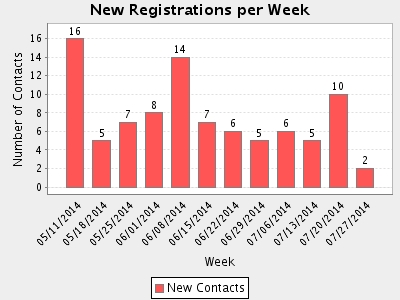
- The Management Console is an extra plug-in to ConcourseConnect which synchronizes user and collaboration space information; at-a-glance graphs show new registrations per week and the number and types of collaboration spaces being created; the Management Console is also used for batch importing and emailing of users, among other administrative functionality
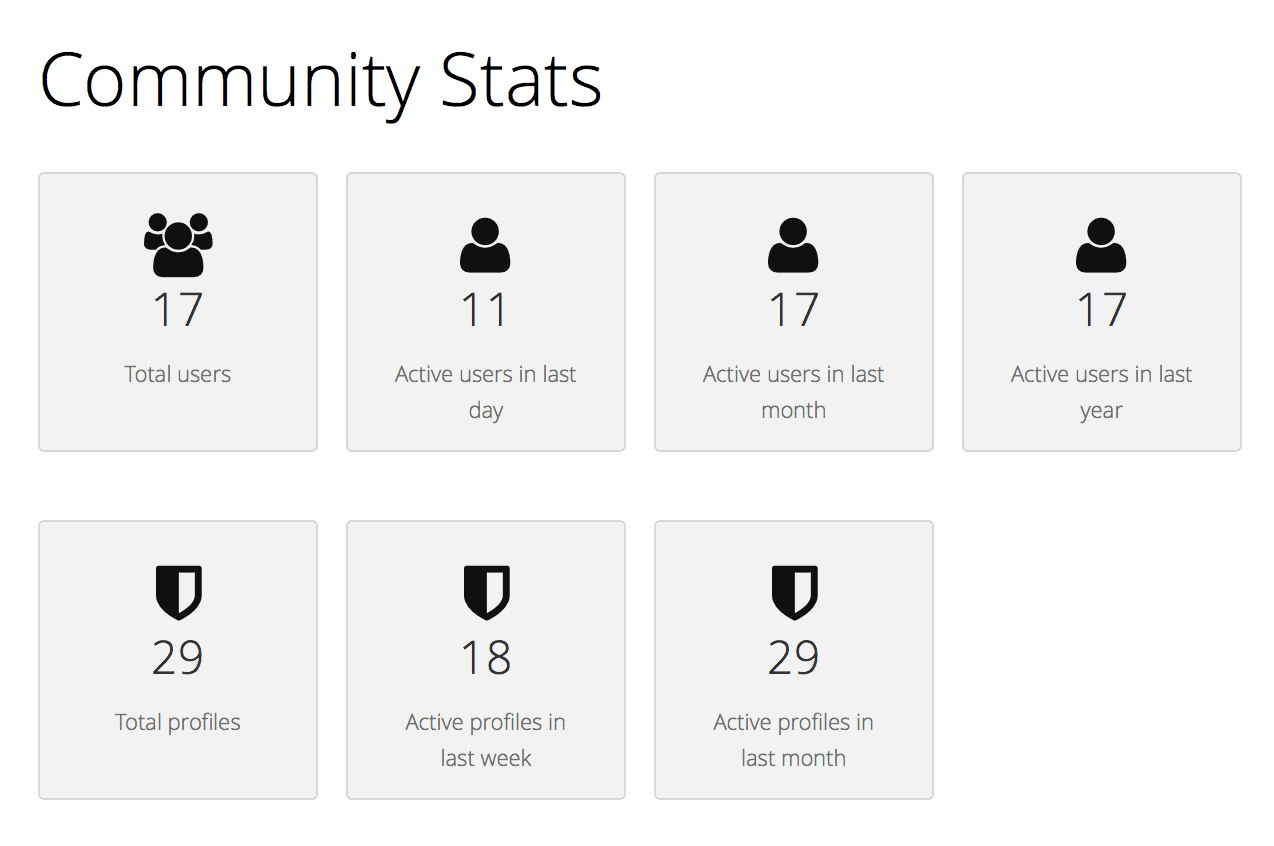
- "Community Stats" within ConcourseConnect shows user totals and frequency of logins, as well as total collaboration spaces and frequency of activity; the Community Stats module is extendable so future widgets will be added
- Raw web site hits and tracking of non-users is typically done with server logs and also through a 3rd-party integration (like Google Analytics)
Here's an example of what you might see in a community just starting out:
View Full Post and Comments
In ConcourseConnect, badges are images, logos, or other visual elements that connote affiliations, associations, or achievements. Some badges are assigned by the Administrator based on status; others can be chosen by users for personalization. Badges are displayed in the profile banners.
For project-based sites and intranets, the following badges are useful:
- Add the "Employee", "Contractor" or "Subcontractor" badge to a user so that their Timesheet tab is enabled. Removing the badge has no reverse effect.
- Add the "Account Management" badge to a user to give them access to all accounts as a Manager. Managers can configure most aspects of an Account. Users can search these accounts. Remove the "Account Management" badge to lower the user's access in all accounts to Member. When additional accounts are created, users with this badge will receive access.
- Add the "Account Admin" badge to a user to give them access to all accounts as a Champion. Champions can invite other users to Accounts. Users can search these accounts. Remove the "Account Admin" badge to lower the user's access in all accounts to Member. When additional accounts are created, users with this badge will receive access.
- Add the "Project Admin" badge to give the user access to all account projects as a Champion. Users can search these projects. Remove this badge to lower the user's access in all account projects to Member. When additional account projects are created, users with this badge will receive access.
- Add the "Timesheet Admin" badge so the user can view all timesheets and edit all timesheets. Remove the badge to disable this feature.
- Add the "Financial Management" badge so the user can view the project rollup of budget and captured amount, as well as the project rate information. Remove the badge to disable this feature.
- Add the "Roles and Rates Admin" badge so that the user can configure roles and rates on all accounts and projects they have access to. Remove the badge to disable this feature.
View Full Post and Comments
Updated July 28, 2014 to include Domain Name expiration monitoring
ConcourseConnect includes its own web app monitoring function. While it is still important to implement a remote monitoring solution, we've added this capability because ConcourseConnect is dependent on various resources and it was important to know right away when something isn't right or to prevent problems in advance. ConcourseConnect monitoring helps find issues that are usually not monitored by other solutions or which take a lot of effort to configure.
Without any configuration, here's what is monitored by ConcourseConnect:
- Web Server Status – Are dynamic web pages available and is the content consistent with expectations? Are there any issues with serving static content, like images?
- File System Availability and Free Space – Is there enough disk space for ongoing operation?
- Database Connectivity – Can the database be reached and successfully execute queries?
- SSL Certificate Analysis – Is the SSL certificate expired or soon to expire?
- Network Availability – Is DNS resolving correctly, can the mail server be reached, or are there any connectivity issues?
- CPU Performance – What is the CPU load?
- Domain name expiration – Is the domain name expiring soon? or if the site isn't working, is it because the domain name is already expired?
Admins of the site receive the emails periodically only when these issues persist. The email property can be overridden so that emails go to a group email or support address. Set the MONITOR.EMAIL_TO property to one or more email addresses.
The monitoring capability was added to ConcourseConnect 5 and expanded in ConcourseConnect 6.
View Full Post and Comments
For any number of reasons, a user may need to be disabled or removed from the system. There are several options here.
Administrators can set an expiration date for a user's account. This is important if the user has been granted temporary access to the system. Perhaps a consultant, vendor, or temporary employee. This is done in the Admin module on a per-user basis. The administrator can also disable a user when they no longer need access. This method maintains all of the user-generated content.
Sometimes users create accounts, they have passed the verification steps, and then they want to be removed from the site, or in the case of unwanted sign-ups, the user needs to be removed for business reasons. Business reasons can be as simple as spam accounts, those user accounts setup to link to other sites or generate content for the purpose of promoting products and services. In those cases, the user account was not setup for the purpose of collaborating and enjoying the site.
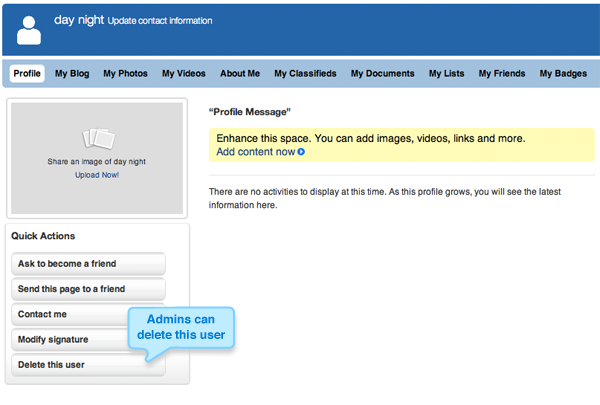
A new feature lets administrators go to the user profile in question, and then choose to delete the user. The user's profile is removed from the system completely, and their email address is marked as no longer acceptable. The user will not be able to login with that email address, nor can it be used for future access. Releated user-generated content is automatically removed.
View Full Post and Comments
ConcourseConnect has several features when it comes to user registrations.
On an open system, users are free to register and become users. There are two default safeguards: the first is that the user must correctly fill out a captcha, and the second is that the user must validate the account by following a confirmation link sent by email.
An additional option is for the administrators to approve all sign-ups. With this option enabled, the user signs-up as normal, and then the administrators receive the confirmation link in which they can approve or deny. This feature has proven useful for semi-open communities in which there public content and you want specific users to register.
Linking your site to Facebook's Login is another option. When you configure both the ConcourseConnect system and the Facebook API with your site's information, users are presented with an option to "Login with Facebook." This option allows users instant access to your site, while Facebook provides all of the validation and authorization of your users. I like this option because Facebook has already verified your user in some way.
ConcourseConnect also has its own token-based sign-up which allows for ConcourseConnect to be plugged into existing websites. In this case your existing site already has user logins, and with some basic programming, site users see a button, called anything you want, which allows one-click access to ConcourseConnect. The sites communicate user information behind-the-scenes and users flow freely from one site to the other.
Finally, a completely closed system means that only administrators and certain users with permission can invite users to the system. In this case the registration feature is turned off and users must fill out a request to become a user.
Now that you have users in your system, my followup blog post explains how to handle the ones that got through your filters.
View Full Post and Comments
As part of Concursive's initiative to provide a simple, cost-effective solution for social business software available at ConcourseCloud.com, we took some time to create some really useful documentation too (thanks Gareth!).
Here are the direct links:
Continue Reading